
How comfy are you with your finance team copy/pasting next quarter’s forecast into Claude to help “massage the narrative” for a board meeting?
Would you be ok with your CSMs dropping a customer’s full account history into their personal ChatGPT to “pull out the best things for our QBR”?
And what about someone using Town or Instinct or another unapproved personal AI assistant on their work laptop to “manage their life, basically”?
Last year, 15% of employees were regular AI users on their work devices. This year it’s 45%, and 67% of them reach AI through non-corporate accounts on corporate machines, according to Verizon’s 2026 Data Breach Investigations Report. Shadow AI is now the third most common non-malicious insider action in DLP data, a fourfold jump in a year.
If you’re under 1,500 employees, it’s worse where you are. 40% of workers at companies that size have entered customer data into public AI tools, against 27% at larger organizations. Two-thirds have used AI at work while believing it broke company policy (PagerDuty, 2026). Hate to be the bearer of bad news, but some version of this is happening in your org right now.
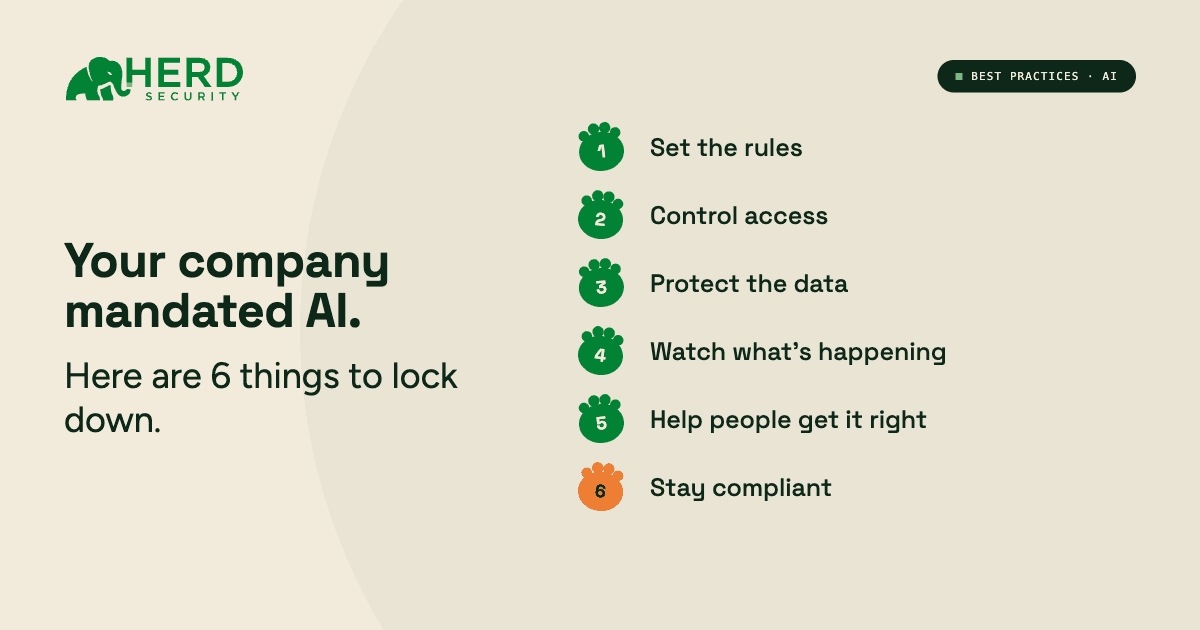
To help you wrap your arms around it, we’ve put together a handy checklist. Run through these 6 steps to keep your data (and your customers’ data) secure:
☐ 1. Set the rules
Sounds obvious, but most companies do not have an acceptable-use policy for AI written up yet. Probably because it sounds like it needs to be official. But that doesn’t mean it needs to be complex. In fact, it should be a page or less, in easy-to-read language, so people read and absorb it.
The gist should be:
- Here are the company-issued AI tools we use, and list them out
- Other AI tools are off limits unless they go through a vetting and procurement process (and link to documentation on that process)
- Here’s what can and cannot go in a prompt, ideally with relevant examples
- As a reminder, AI should be used to assist you in your job, rather than perform it
- You are responsible for AI output (reinforcing the “assist” part above)
- What counts as “breaking the rules,” how to tell someone about it, what you shut off, what you log
That last line matters more than it looks. Someone will paste customer PII into a public tool. Having a written response is the difference between an incident you handled and a finding in your next audit.
One more thing once it’s written. Put the policy somewhere your people can ask it questions. Herd grounds its Slack agent on your real policy docs through Notion or SharePoint, so when someone wonders “can I paste this into Claude?” they get your company’s answer in the thread instead of guessing.
Helpful hint: Set a reminder to update this every quarter, maybe even every month. Things are changing so fast that you’ll have items to add or things to edit at least that frequently.
☐ 2. Control access
Even if you’re a startup, you should think about getting a team or enterprise account. Yes, they are more expensive than personal free logins. But in those higher-tiered plans, you know your employees’ prompts aren’t training public models, and you keep an audit trail.
Plus, then you can use SSO, which (1) makes the login process seamless, and (2) instantly revokes access when people leave.
Also consider how you’ll manage browser extensions and third-party AI apps. Think meeting note bots, email assistants, etc. These are dangerous because they read every webpage and listen to every meeting. Pick one of three approaches:
- Allow-list: only pre-approved tools will work and everything else gets blocked
- Block-list: specific bad actors are banned, but everything else is fair game
- Request-based: employees can ask to use a new tool, and IT approves with some kind of SLA
Helpful hint: Don’t forget about contractors, agencies, and freelancers. They will probably be using AI to do at least some of the work you’re paying them for. Giving them a company email and adding them to your training process is the simplest way to minimize human risk.
☐ 3. Protect the data
Data sharing is no joke, especially if you’re going for a SOC 2 report or already have one. Know exactly what data rules apply to your company (GDPR, CCPA, HIPAA, etc.) and then:
- Classify what counts as sensitive for prompts, such as (but not limited to): credentials, customer PII, regulated data, unreleased product roadmaps, M&A conversations, board decks.
- Turn on data-loss controls where possible, and check whether your AI vendors retain or train on your inputs. Defaults vary wildly. Some vendors keep prompts for 30 days, some indefinitely, so adjust your settings and/or talk to your CSMs about limiting use.
- Confirm that you have a signed (really check!) DPA with each AI vendor holding company data. Without one, you’re on the hook if that vendor has a breach or misuses your data.
Helpful hint: Don’t forget about integrations. Frontier AI companies won’t ever say “please give me your data,” but they will say, “FYI, our product works way better when it has examples to work from” (essentially the same thing). Audit OAuth connections in your Google Workspace or Microsoft 365 admin console at least quarterly to keep a close eye.
☐ 4. Watch what’s happening
You can’t secure what you can’t see, and most orgs are flying pretty blind on AI tools right now. Take stock of what’s going on by:
- Identifying any shadow AI. Pull a browser extension inventory, look at your egress traffic, check calendar invites for AI notetakers, ask your employees about the AI tools they use. You could even ask finance to pull every SaaS charge under $50/month on company cards over the last quarter.
- Figure out what employees are putting in their prompts. For the AI you did approve, Herd’s AI Coach connects read-only to your organization’s Claude, ChatGPT, or Microsoft 365 Copilot through the providers’ own compliance and audit APIs. No browser extension, no endpoint agent. It scores every conversation and surfaces policy violations by severity, and no admin ever reads a chat. A finding records that a policy fired, not the content that fired it. Personal accounts and unmanaged tools sit outside what any compliance API can see, which is what steps 1 and 2 are for.
Helpful hint: Again, set a review cadence. Monthly is good to start. Look for patterns, like people who suddenly stop using a certain tool or a spike in prompts with customer names, to see where to focus your next policy update or round of coaching.
☐ 5. Help people get it right
Security isn’t about gotchas, it’s about learning. Besides shaming people (which is never a good idea), a fat red “FAILED” at a phishing sim doesn’t teach people anything. It tells them they got caught.
What people actually want to know is what they got wrong, why it matters, and how to fix it, all in real time. To do that, you need security awareness training that:
- Gets deployed in apps they already use, like Slack and Teams.
- Is short. 10 to 15 minutes will make it still engaging, and stick.
- Has conversational AI built in, so people aren’t afraid to ask questions, like “Is this ok to paste into AI?”
- Shows, doesn’t tell. One of Herd’s trainings, for example, prompts employees to record a 10-second voice sample. Then, it sends the sample to an AI voice cloner and plays back the real and cloned versions for people to identify, showing just how difficult it is to distinguish even your own voice.
Helpful hint: Most employees aren’t great at prompting yet, and that could be costing you a lot of money. Beyond security awareness training, make sure you teach folks how to use AI effectively.
Note: Herd’s AI Coach evaluates AI conversations on eight dimensions of prompting craft and flags when someone used the most expensive model on a task a cheaper one could’ve handled easily.
☐ 6. Stay compliant
As much as people poke fun at how slowly regulation gets passed, the truth is privacy and compliance rules do change relatively quickly. And even quicker now with AI. Make sure you are actively:
- Tracking how AI applies to the frameworks you abide by, such as SOC 2, ISO 27001, and HIPAA. You’ll also need to be aware of ISO 42001, the equivalent of ISO 27001 for responsible AI use, and the EU AI Act, if you have European users or employees (Article 4 has required deployers to train staff on AI literacy since February 2025).
- Keeping evidence you can hand an auditor. That includes your one-page AI use policy, with your approved tools, and proof that monitoring and coaching are happening.
Helpful hint: Some tools, like Herd, log security training progress automatically, remove likely bots and shared mailboxes, and connect directly to the tools your reporting already depends on (identity tools like Okta, Entra ID, HRIS platforms like Workday, BambooHR, and Rippling, and compliance platforms like Drata) so you can pull evidence at any time on your own.
Get the printable version
Download the AI mandate security checklist. All six steps on one page, with a column for the owner and the date each one was completed. Built to drop straight into your audit folder.
Want the monitoring and coaching handled for you? See Herd’s AI Coach in action.